Best Apps for Revenge Bedtime Procrastination (2026 Comparison)
Compare 7 apps for revenge bedtime procrastination, including app blockers, screen-time tools, and guided routines. See features, prices, and who each suits.
People stay up later than intended for different reasons. You might want more time to yourself, keep scrolling longer than planned, or struggle to finish the evening. Different tools help with different parts of that, and the best app for revenge bedtime procrastination is the one that deals with why you stay up, not just what you do while you're up.
This comparison looks at seven options, from app blockers and screen-time limits to guided routines. MyNightfall is our pick for people who want going to bed on time to be their own choice, rather than something a locked phone forces on them.
Disclosure: We make MyNightfall, which is included in this comparison and ranked first for guided bedtime routines. We're not an independent reviewer. We chose the other tools because they offer different approaches to nighttime phone use and bedtime habits. Features and prices were checked against official websites or app listings in November 2026.
The best apps at a glance
| App | Best for | How it works | Platforms | Price |
|---|---|---|---|---|
| MyNightfall | A guided ending to the evening | Three-minute ritual with a companion who remembers you | Browser (phone or desktop) | 3 completed nights free; $9.90/mo, $49/yr or $79 once |
| ScreenZen | Pausing before opening distracting apps | Delays, limits, and schedules | iPhone, Android, Mac, Windows | Free, optional donations |
| Opal | Scheduled app blocking | Blocks selected apps during scheduled sessions | iPhone, Android, Mac | Free plan; Pro $99.99/yr |
| one sec | Interrupting automatic app opening | Adds a pause before selected apps or websites open | iPhone, Android, browser | Essentials free |
| Finch | Building self-care habits | A virtual pet that grows as you complete self-care activities | iPhone, Android | Free, optional Plus |
| iPhone Screen Time | Built-in screen-time limits | Built-in schedules and time allowances | iPhone | Free, built in |
| Android Bedtime mode | Making your phone less distracting at bedtime | Built-in grayscale, Do Not Disturb and a dark screen on a schedule | Android | Free, built in |
1. MyNightfall: best for a guided end to the night
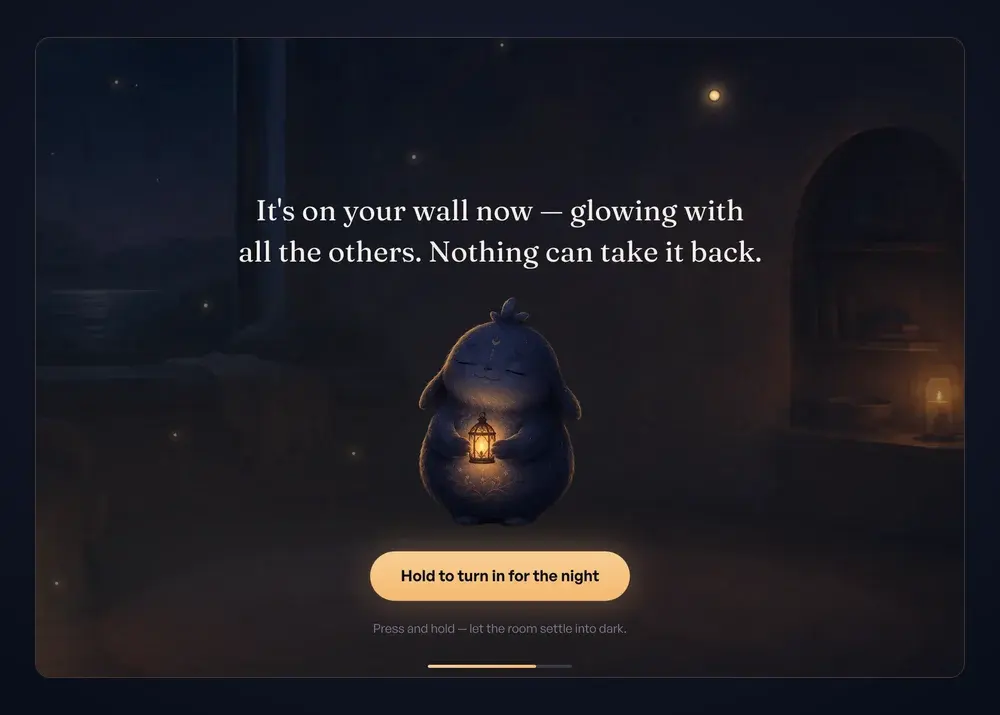
Revenge bedtime procrastination usually isn't about the phone itself. Late evening is the only time that feels like yours, so you hold on to it. Locking the apps doesn't change that feeling; it can make the night feel like one more thing taken away. MyNightfall is built for exactly that: a short night routine that lets you close the day your own way, so going to bed on time becomes something you want to do and the morning doesn't start with regret.
It's a three-minute night routine that works in your browser, with nothing to download. You open your room, where an AI companion greets you and remembers what you've shared on previous nights. You choose what's keeping you up (unfinished tasks, a busy mind, scrolling, wanting time that's yours, or something you write yourself), follow a soft light through three slow breaths, and your companion answers with a few words about tonight. Then you write one line, tap the wall to hang it as a light, and press and hold as the room goes dark.
What you get:
- A clear stopping point. The ritual ends when the room goes dark under your hand. There's no feed to keep scrolling and no open-ended chat.
- A companion that remembers you. It picks up on what you've shared before, so the nights build on each other instead of starting from zero.
- A wall that fills up. Every night you finish adds a light, so you can see the evenings you've taken back.
- No streaks, no guilt. Miss a night or a week and nothing resets. The room is there when you come back.
- A reminder 20 minutes before your bedtime, by email, browser notification or both.
- An honest bedtime log. MyNightfall saves the time you finish as your bedtime, and shows your trend on the Looking back page. It doesn't track when you fall asleep.
The "write it down" step draws on sleep research: in a 2018 sleep-lab study, young adults who wrote a to-do list before bed fell asleep faster than those who wrote about finished tasks. That study tested a five-minute writing task, not MyNightfall itself.
Price: your first three completed nights are the full ritual, free, with no credit card and no deadline. After that it's $9.90/month, $49/year, or $79 once for lifetime. Your wall and share cards stay yours either way.
2. ScreenZen: best for pausing before opening distracting apps
ScreenZen adds a delay before selected apps open, and you can make that delay longer when you reopen them. It also offers daily goals, schedules, stricter blocks, and a lock mode.
It works on iPhone, Android, Mac, and Windows. It's free, with optional donations.
ScreenZen is a good fit if you frequently open apps without intending to. It slows the habit down, but it doesn't change why you reached for the phone at midnight in the first place, and it doesn't give the night an ending.
3. Opal: best for scheduled app blocking
Opal lets you block selected apps during scheduled sessions. Its free plan includes one rule and app blocking. Pro adds Hard Mode and unlimited rules for $99.99 a year, $19.99 a month, or $399 as a one-time purchase.
Opal is worth considering if you want stronger restrictions on app access at particular times, including bedtime. It also supports focus sessions during the day.
4. one sec: best for interrupting automatic app opening
one sec adds a short pause before selected apps or websites open. That moment gives you a chance to decide whether you still want to continue.
In a 2023 PNAS study, researchers reported 57% fewer attempts to open selected apps after six weeks. One of the researchers created one sec, which is important context when interpreting the result. The study examined app-opening behavior, not sleep outcomes.
The essential features are free, and one sec works on iPhone, Android, and browsers. Like ScreenZen, it interrupts the reflex rather than giving your night an ending, so it suits nights when the scrolling is automatic more than nights when you're hungry for time of your own.
5. Finch: best for building self-care habits
Finch uses a virtual pet to encourage self-care activities. As you complete goals and look after yourself, you also help care for your pet.
It's available on iPhone and Android, with a free version and optional Finch Plus subscription.
Finch may suit someone who enjoys setting personal goals and receiving encouragement. It's a gentle all-day habit builder rather than a bedtime routine, so it won't walk you through the end of the night.
6. iPhone Screen Time: best for built-in app schedules and limits
iPhone Screen Time lets you set schedules for app availability and daily time allowances. Since iOS 27, these are presented through Screen Time schedules; older versions used the names Downtime and App Limits.
It's free and built into the iPhone. You can configure limits that fit your evenings without downloading another app. See Apple's Screen Time guide for setup instructions.
Screen Time is a useful starting point if you want scheduled restrictions. It's only as firm as its passcode: if you set the Screen Time passcode yourself, the 1 a.m. version of you can change it too, so it holds best when someone else sets it.
7. Android Bedtime mode: best for a quieter phone at night
Android's Bedtime mode is part of Digital Wellbeing. Depending on your device, you can schedule features such as grayscale, Do Not Disturb, and a darker screen. You may also be able to activate it while your phone charges.
It's free and built into Android. See Google's Bedtime mode guide for setup instructions.
Bedtime mode can reduce visual distractions and notifications, but it doesn't block apps or give the evening an ending, so it works best as a nudge alongside one of the other tools here.
How to choose: apps to stop scrolling at night or a bedtime routine app
Start from what keeps you up. For each case, here's how MyNightfall handles it, followed by the other options and what to know about them.
- If you stay up because the night feels like the only time that's yours: MyNightfall gives that time a deliberate ending: a few minutes that are clearly yours, a line on your wall, and lights out. Blockers such as Opal and iPhone Screen Time lock apps at a set hour; they don't address why you wanted the time in the first place, so a lock can feel like one more thing taken from you.
- If you open apps without thinking: MyNightfall's bedtime reminder can call you to the room 20 minutes before your bedtime, before the scroll starts, and the ritual gives you something to finish. ScreenZen and one sec add a pause before selected apps open; the pause only appears when you reach for those apps, and you can continue past it.
- If you want firm limits: MyNightfall works alongside them: set a limit, then use the ritual to close the night. Opal's free plan includes one blocking rule; more rules and Hard Mode need Pro ($99.99/year, $19.99/month, or $399 once). iPhone Screen Time and Android Bedtime mode are free and built in; if you set the Screen Time passcode yourself, you can also turn it off yourself.
- If your mind won't settle: MyNightfall asks what's on your mind, lets you set it down in one line, and remembers it for next time. Finch covers self-care goals across the whole day with a virtual pet; it isn't built around a bedtime ending.
You can also combine them: a phone limit to stop the scroll, and MyNightfall to end the night on purpose.
Free apps to go to bed earlier: what can you use?
If you want a free tool for managing evening phone use, there are several options:
- ScreenZen: Free, supported by optional donations.
- one sec: Its essential features are free.
- Opal: Offers a free plan with one blocking rule.
- iPhone Screen Time: Free and built into supported iPhones.
- Android Bedtime mode: Free and built into Android.
Finch also has a free version for self-care activities, with an optional Plus subscription.
MyNightfall offers the full guided ritual for your first three completed nights, with no credit card or deadline. Afterward, starting new rituals requires a paid plan.
The free blockers manage what your phone lets you open. If what keeps you up is wanting the night to be yours, MyNightfall's three free nights are the simplest way to find out whether a guided ending works for you.
Why MyNightfall ranks first for a guided bedtime routine
We make MyNightfall, so take this as the maker's view. We rank it first because it's the only option here built around the reason people stay up late: wanting the night to be theirs.
Blockers and limits are good at the phone. They aren't built for that feeling. MyNightfall works on the feeling: three minutes to close the day your own way, a companion that remembers what you've shared, and a wall that fills with the nights you've taken back, so going to bed on time starts to feel like your choice. There's nothing to scroll, no streak to protect, and the first three nights are free.
If revenge bedtime procrastination is what keeps you up, start there.
FAQ
Is MyNightfall an app blocker?
No, on purpose. When the night feels like the only time that's yours, a lock can feel like one more thing taken away, which makes it tempting to work around. MyNightfall gives the night an ending instead: a three-minute guided ritual you choose to start, with a companion who remembers you.
If you also want hard limits, ScreenZen, Opal, one sec, or your phone's built-in controls pair well with it: the limit stops the scroll, MyNightfall closes the night.
Is there a free app for revenge bedtime procrastination?
Yes. MyNightfall's full guided ritual is free for your first three completed nights, with no card and no deadline, which is enough to tell whether a proper ending to the night works for you. After that, starting new rituals needs a paid plan.
If you want free app limits instead, ScreenZen is free with optional donations, one sec offers free essential features, and Opal has a free plan. iPhone Screen Time and Android Bedtime mode are built in, and Finch has a free version. Those manage the phone or daytime habits; MyNightfall is the one built around ending the night.
Won't another app keep me on my phone longer?
Not this one. MyNightfall is built to end: the nightly ritual takes about three minutes in your browser, and it finishes when you press and hold to darken the room. There's no feed to keep scrolling, no open-ended chat, and no streak to maintain.
A feed keeps loading the next thing; the ritual has a last step. Putting the phone down afterward is still up to you, and that's exactly the moment the ritual is designed to hand you.
Is MyNightfall a treatment for insomnia?
No. MyNightfall is a guided bedtime ritual, not a medical product or treatment for insomnia. It records when you finish the ritual, but it doesn't monitor sleep or detect when you fall asleep.
If you regularly struggle to fall asleep, stay asleep, or feel rested despite allowing enough time for sleep, consider speaking with a healthcare professional.
Author
Let tonight end on time.
A three-minute night ritual with a companion who remembers you. First three nights free, no card.
Start your first night — freeMore posts
Revenge Bedtime Procrastination: Why You Stay Up Late
Revenge bedtime procrastination is staying up late for personal time, even when you're tired. Learn why it happens and what you can try to change it.

Night Routine Checklist: 10 Simple Steps Before Bed
An interactive night routine checklist for adults with 10 simple steps before bed, plus a morning list. Tick, edit and print your own version.
Journaling Before Bed: What to Write and How to Start
Journaling before bed can be as simple as writing a few lines. Learn what to write, what research says about bedtime writing, and how to start.